
FCPXML to AAF,
without losing your roles.
Final Cut Pro (often written FCPX or FCP X) does not export AAF. It exports FCPXML — a description of your timeline. This page explains how that file becomes a Pro Tools session that opens organised, at the right timecode, with the audio inside.
Why Final Cut Pro cannot write an AAF itself
Final Cut Pro speaks FCPXML. Pro Tools speaks AAF. Neither reads the other, and Apple has never shipped a bridge.
An FCPXML describes your edit: which clip, from which file, at which point on the timeline, in which role, with which volume. It contains no audio at all — only paths pointing at your rushes.
An AAF is what the sound department expects. It carries the edit and, when it is self-contained, the audio itself. A mixer who has never seen your rushes can open it and hear everything.
Converting means reading the timeline, going to fetch the audio from each source file, cutting each region at the sample, and rebuilding the whole thing in a format Pro Tools understands. That is the entire job — and where the differences between tools show up.
.fcpxml or .fcpxmld — which one do you have?
Since Final Cut Pro 11, File > Export XML produces a
.fcpxmld bundle rather than a lone file. macOS displays it as a
single item, but it is a folder holding the XML and its resources.
AAFx reads both. You drop the bundle as it is — no need to right-click, show package contents and dig for the XML inside. And because AAFx reads the structure of your timeline rather than checking a schema number, a future Final Cut release that bumps FCPXML past 1.14 will not lock you out.
What Pro Tools actually receives
Below, a real magazine episode: 26 minutes, 485 audio clips, 18 roles, 194 source files spread over four volumes.
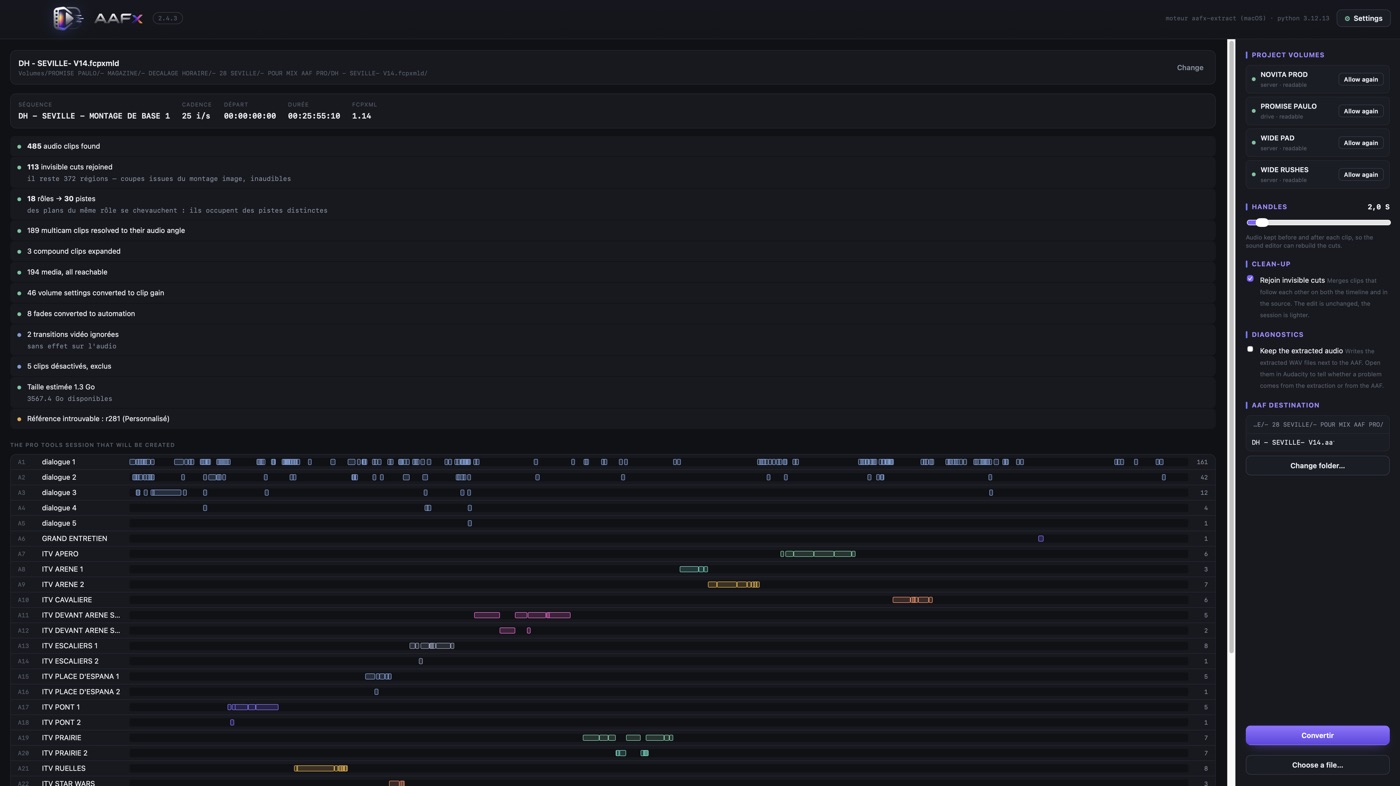
Everything is announced before a single byte is written: how many clips were found, how many invisible cuts were rejoined, how many multicam clips were resolved to their audio angle, which clips were disabled in the edit and therefore excluded, and how much disk the AAF will need.
One track per role, in an order a mixer expects
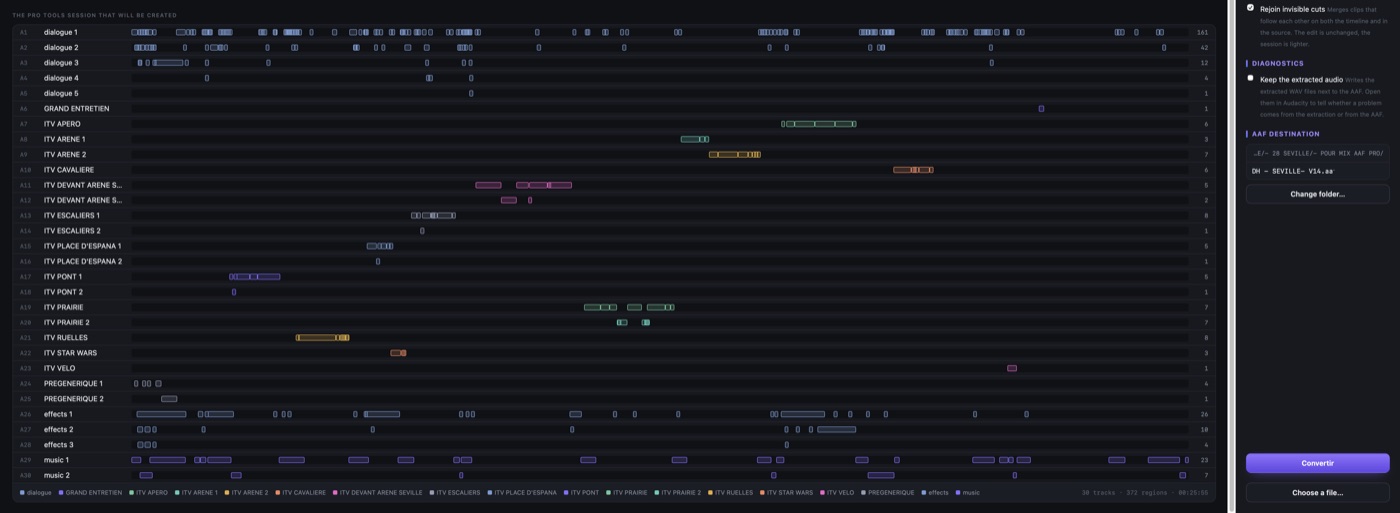
Dialogue opens the session. Then the roles you created in Final Cut — here one per interview location — then effects, then music. Where clips of the same role overlap, they take neighbouring sub-tracks instead of piling up. Nothing is anonymous, nothing needs re-sorting before the mix can start.
How it works, in four steps
Export the XML from Final Cut Pro
Select your project, then File > Export XML. Keep the default
settings. You get a .fcpxmld bundle, or a .fcpxml
file on older versions.
Drop it on AAFx
AAFx reads the roles, counts the clips, and checks that every media file is reachable. If a drive is missing, it names the files, their role, how many clips use them and which volume it expects.
Set the handles, then convert
Choose how much audio to keep before and after each region — from zero to thirty seconds. The sound editor can then rebuild any cut without asking you for the rushes.
Import in Pro Tools
File > Import > Session Data, pick the AAF, import all tracks. The session opens named and at the right timecode.
What travels, and what does not
Being honest about the second list matters more than boasting about the first — it is what stops a bad surprise on the dub stage.
Carried over
- Roles and subroles, as named tracks
- Source timecode of every region, rush by rush
- Handles before and after each clip, up to 30 s
- Clip gain and fades, as automation
- Multicam clips, resolved to their active audio angles
- Compound clips, expanded
- Audio essence itself, embedded at 48 kHz / 24-bit
Not carried over
- Audio effects and plug-ins — they are rebuilt on the sound side
- Pan settings
- Speed changes: a retimed clip travels at normal speed
- Video, titles and graphics — this is an audio delivery
Why a stereo clip becomes two tracks
It surprises everyone the first time. Split mono is the convention of AAF exchange — Pro Tools and Media Composer write their own AAFs that way, one file per channel. Interleaved stereo is readable, but encoders produce it inconsistently, and a region whose descriptor disagrees with its essence is read with the wrong stride: what comes out is saturated noise, even when the embedded audio is perfectly intact.
AAFx therefore splits every source into one mono track per channel — and, beyond stereo, discards channels that carry only silence. A 16-track field recording does not become 16 tracks in your session; only the channels with sound survive. That is why the session has more tracks than the Final Cut timeline, and why it sounds right.
Questions people actually ask
Does Final Cut Pro export AAF natively?
No. It exports FCPXML, a description of the timeline. Pro Tools does not read FCPXML, so a conversion step is required.
What is the difference between .fcpxml and .fcpxmld?
A .fcpxml is a single XML file; a
.fcpxmld is a bundle containing that XML and its resources. Final Cut
Pro 11 and 12 write bundles by default. AAFx reads both.
Which FCPXML versions are supported?
From Final Cut Pro 10.4 up to Final Cut Pro 12.3, including FCPXML 1.14. AAFx reads the structure of the timeline, not a fixed schema version.
Do I need ffmpeg, Homebrew or the Terminal?
No. Python and the audio extractor travel inside the application. Nothing is installed on your Mac.
What if the rushes are on a drive that is not connected?
AAFx names every missing file and the volume it expects. Point it at a folder and it relinks by source timecode and exact duration — so two rushes with the same name from different shooting days can never be confused.
Keep reading
AAFx compared with X2Pro, feature by feature — including where X2Pro remains the better choice.
Back to the AAFx home page — what the app does, pricing and the 7-day trial.