

Export an AAF from Final Cut Pro,
step by step.
Final Cut Pro cannot write an AAF. It writes FCPXML, which a converter turns into a session Pro Tools can open. Six steps, and the two that matter happen before you export anything.
1. Tidy your roles first — this is the whole job
Everything downstream depends on this step, and it is the one people skip.
Open the Index, go to the Roles tab. Every clip should sit in a role
that means something to the sound department: dialogue,
effects, music, plus named subroles for each interview,
location or speaker.
Roles are what become named tracks in Pro Tools. A clip left in the default role arrives anonymous, and the mixer starts by sorting instead of mixing. Ten minutes spent here saves an hour at the other end.
A practical habit: name subroles after what they are, not where they came
from. ITV KITCHEN tells a mixer more than CAM B.
2. Switch off the audio you do not want to send
Reference masters laid on the timeline, temp music, takes you muted — anything whose sound must not travel. Select the clip and disable its audio.
What is disabled in the edit stays out of the AAF. On one real episode this removed a full programme master that would otherwise have poured twenty-six minutes of finished mix into the session.
3. Export the XML
Select the project in the browser, then File > Export XML. Keep the default metadata setting.
Final Cut Pro 11 and 12 write a .fcpxmld bundle — macOS shows it
as one item but it is a folder. Older versions write a single .fcpxml
file. Both work; you never need to open the bundle.
4. Drop it on AAFx and actually read the report
This is your last chance to catch a problem cheaply.
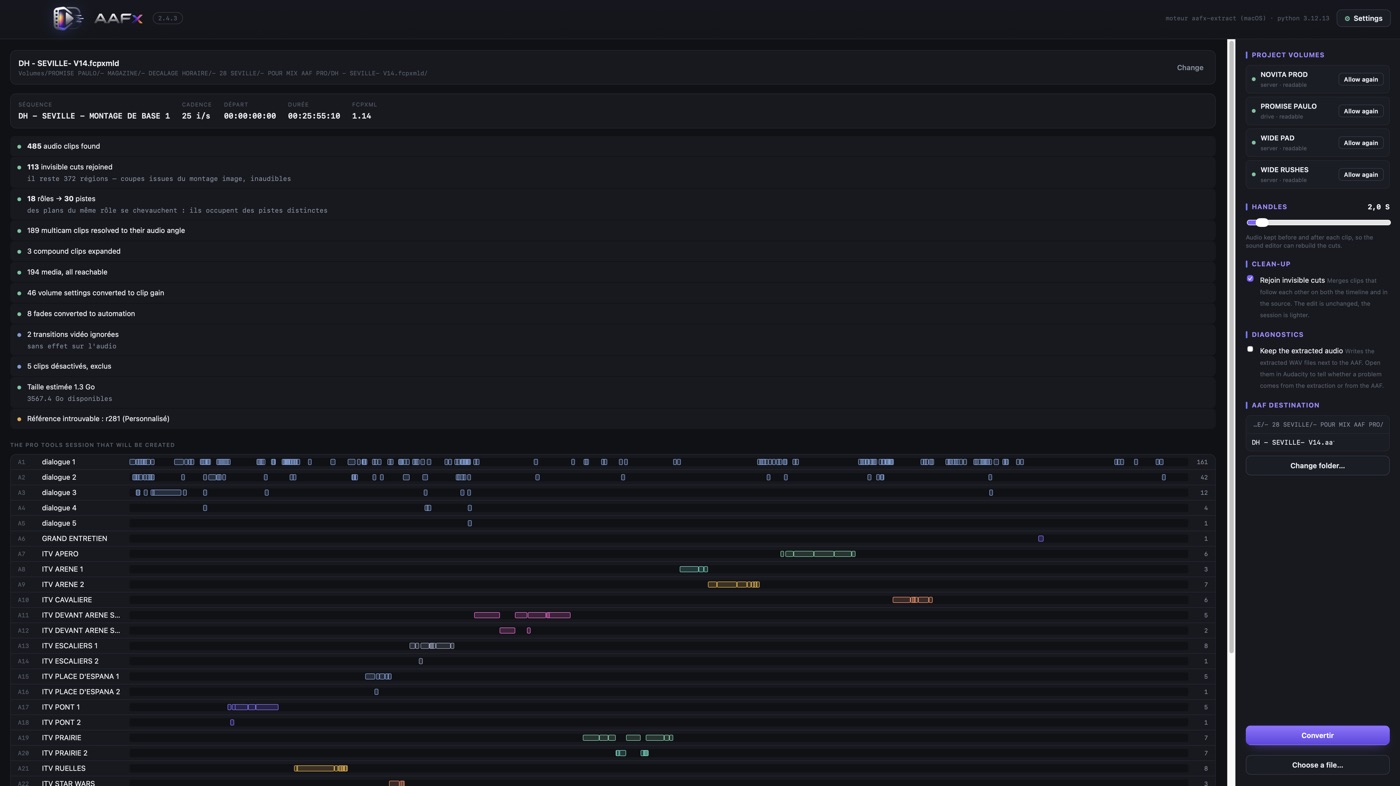
Check three things before clicking anything:
- Media reachable. If a drive is missing, AAFx names the files, their role, how many clips use them and the volume it expects. Connect it, or point AAFx at a folder — it relinks by source timecode and exact duration, never by filename.
- The track list. It shows the session you are about to create. If a role is missing or misnamed, go back to Final Cut now, not after.
- Excluded clips. The count of clips left out because their audio is disabled. If it looks wrong, something is muted that shouldn't be.
5. Choose your handles
Handles are the audio kept before and after each cut, so the sound editor can rebuild a transition without asking you for the rushes.
Two seconds is right for a fast-cut magazine. Ten to thirty seconds suits drama, where transitions get reworked. The file grows in proportion — AAFx shows the estimate past ten seconds, so you know before you commit.
When in doubt, ask the person receiving it. It is the one question sound editors always have an opinion about.
6. Import in Pro Tools
File > Import > Session Data, select the AAF, and choose to import all tracks. The session opens with named tracks, each region at its timeline position, carrying the source timecode of its own rush.
Nothing is offline: the audio essence travels inside the AAF.
Keep reading
When the AAF arrives wrong — white noise, offline media, anonymous roles, missing multicam audio.
FCPXML to AAF, explained — why Final Cut can't write an AAF itself, and what travels.